About Bubble Safari
Aim and pop clustered bubbles hanging from a cave wall, with a star meter fed by burst value and power-ups that each cost a rewarded video.
A straightforward bubble shooter with a real twist worth knowing about: the star meter fills from burst value, and every power-up is charged by watching an ad.
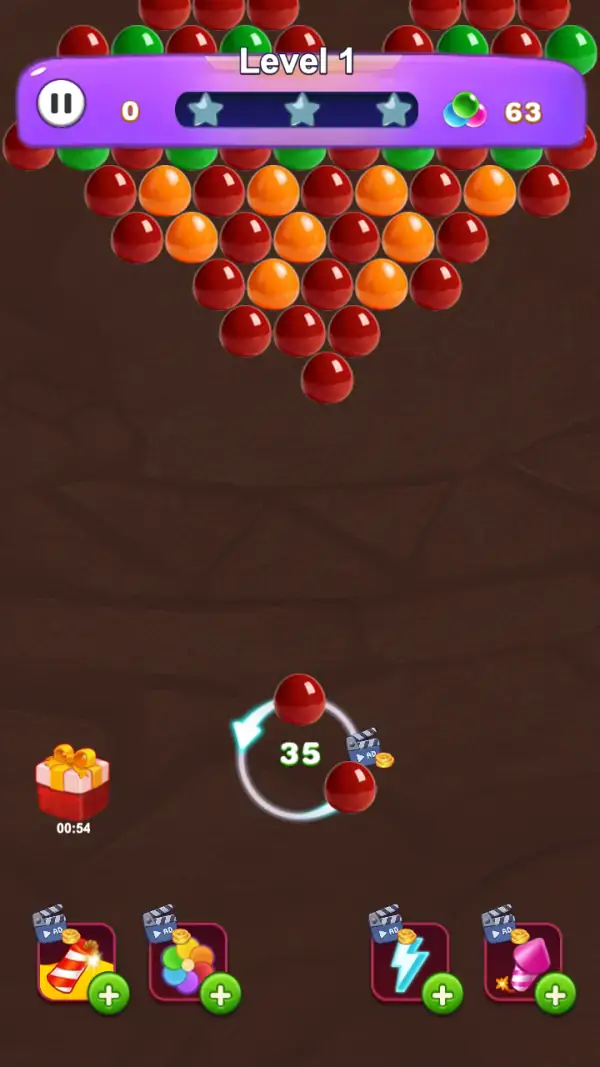
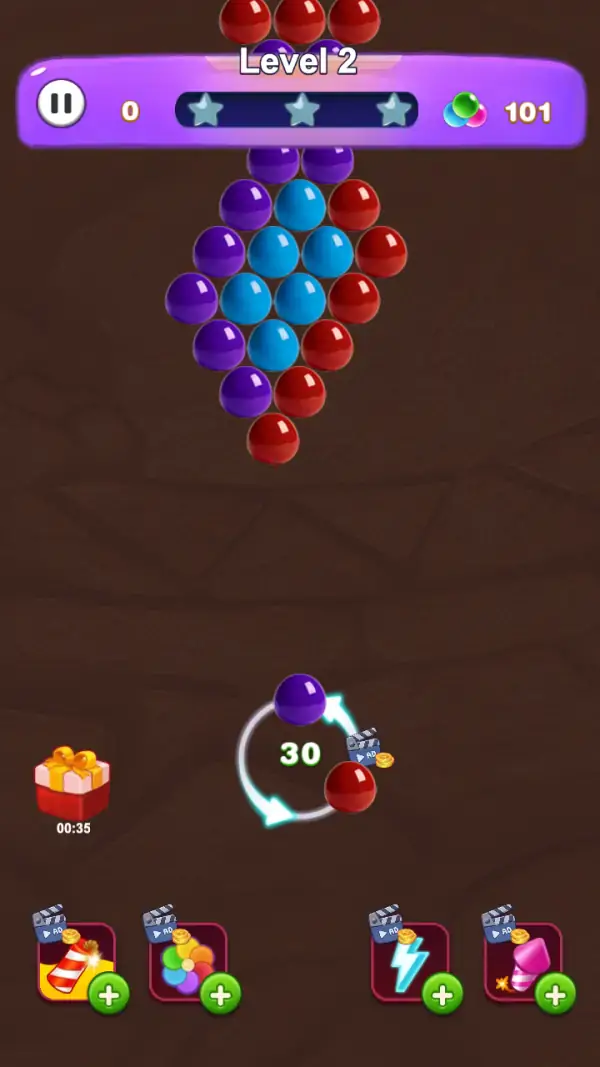
A dense triangular raft of bubbles hangs from the top of a brown cave wall — red, orange and green clusters on Level 1, purple, blue and red on Level 2 (frames 1, 3). Below it sits the shooter: a circular reticle carrying the loaded bubble and the next one in the queue, with a number in the middle that read 35 on the first board and 30 on the second (frames 1, 3). Aim, release, and a group of a colour pops.
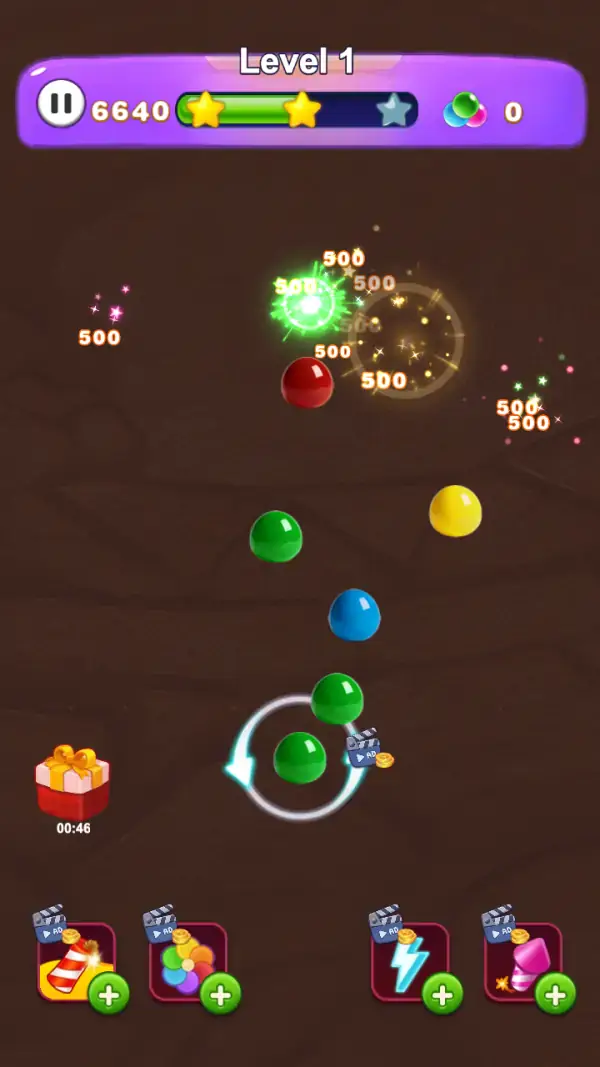
The purple HUD bar carries the whole scoring story: a pause button, the score, a row of three star slots over a fill bar, and a three-bubble icon with a number beside it (frames 1–3). Mid-shot, the score had climbed to 6640, two of the three stars had turned gold with the green fill bar running behind them, and eight value popups were rising off the board — every one of them reading 500 (frame 2). The stars are therefore paid for in burst value, not in moves saved.
Two things sit outside the board and both matter. On the left is a gift box with its own countdown — 00:54, then 00:46, then 00:35 across our three frames — which is a timed free prize rather than a level timer. Along the bottom are four power-up slots, each wearing a clapperboard badge and a green plus sign (frames 1–3): a striped rocket, a cluster of multicolour balloons, a lightning bolt and a pink mallet. The charges in those slots come from watching videos.
Gameplay screenshots
Captured from the build running on this page, not promotional art. Every claim in the guide above names the frame it comes from.
How to Play
- Check the colour of the bubble in the reticle before you aim, then find the largest group of that colour hanging on the wall (frame 1).
- Aim for the seam between two clusters rather than the middle of one — a bubble that lands on a boundary can pop both.
- Bank on the drop: anything left hanging after a pop falls and scores on its own, which is where the eight 500-value popups in one burst come from (frame 2).
- Watch the three-bubble counter in the HUD. It read 63 at the start of Level 1 and 0 part-way through the same level (frames 1–2), so it is the number the level spends down.
- Save a power-up for a cluster you physically cannot reach, not for one that merely looks tedious.
- Tap the gift box while its timer still runs — it counts down during play, from 00:54 to 00:35 across our three frames.
Burst value buys the stars
Frame 2 shows eight separate popups from one collapse, each worth 500, and the star row had already turned two of its three stars gold at a score of 6640. A single good drop is therefore worth several plain hits, which is why the counters are the numbers to respect rather than the score itself.
Two counters, and we could not settle which is the shot budget
The reticle number read 35 on Level 1 and 30 on Level 2 (frames 1, 3), while the three-bubble icon in the HUD read 63 on Level 1, 0 part-way through the same level, and 101 on the fresh Level 2 (frames 1–3). The icon is the one that clearly gets spent and resets per level; the reticle number changes between levels but we never watched it tick down. Treat the icon as the budget you are spending and the reticle number as something the level config sets.
Four power-ups, all ad-charged
The bottom row holds a striped rocket, a balloon cluster, a lightning bolt and a pink mallet, each with a clapperboard icon and a green plus (frames 1–3). The plus is how you add a charge, and the clapperboard is what it costs.
Tips & strategies
- The three stars are a value threshold, so a level can be finished and still rate poorly if you got there with small pops. On frame 2 two of them are gold and the third is still grey at 6640.
- The two numeric counters disagree and the game does not label either. The bubble icon went 63 → 0 → 101 across our frames while the reticle read 35 then 30, so we are reporting both readings rather than guessing which one is ammo.
- Every power-up slot carries a green plus on the first board (frames 1–3): a charge you did not buy is not there, so plan shots without them.
- The pause button is in the HUD bar, which is also where the score is — the top strip is information, the bottom strip is action.
Where players go wrong
- Reading the gift box countdown as a level timer. The board does not expire; the gift does.
- Firing at the nearest cluster instead of the one whose removal drops the most bubbles.
- Using an ad-charged power-up to finish a level you could have finished with two careful shots.
Playing on phone, tablet and desktop
Portrait, with the bubble wall occupying the top third and the shooter in the lower middle — the aim line is dragged with a thumb and the four power-up slots are all within reach at the bottom edge. On desktop the same drag becomes a mouse aim. No keyboard input appears on any captured frame.
Frequently Asked Questions
Is there a time limit in Bubble Safari?
Not on the board. The only countdown on screen is attached to the gift box at the left, which ticks down while you play (00:54 to 00:35 across our frames). What does end a level is one of the two counters running out.
How do you earn stars?
From burst value. The HUD shows three star slots over a fill bar, and two of the three had turned gold by a score of 6640 while eight popups of 500 each were rising off the board (frame 2).
What are the four icons along the bottom?
Power-ups — a striped rocket, a balloon cluster, a lightning bolt and a pink mallet. Each carries a clapperboard badge and a green plus, meaning charges are added by watching a video.
What does the number in the circle at the bottom mean?
It is one of two counters and the game never labels it: 35 on Level 1 and 30 on Level 2 (frames 1, 3). The other one, the three-bubble icon in the HUD, read 63, then 0 on the same level, then 101 on Level 2. We are not going to tell you which is shots when the frames do not settle it.
Does it need an account?
No. There is no sign-up on Tapzens, and the game runs in the browser. A "Sign In" style prompt inside a build would be the game's own save option, not a requirement to play.