
About Satisfying Stack
Pick up a stack and Push or Merge it on a twelve-cell tray, chasing milestone targets that read 5, 6, 7, 9 and 10.
A merge puzzle on a twelve-cell tray: choose a stack, then Push or Merge it, with a milestone track reading 5, 6, 7, 9 and 10 and only five of the twelve cells open at the start.
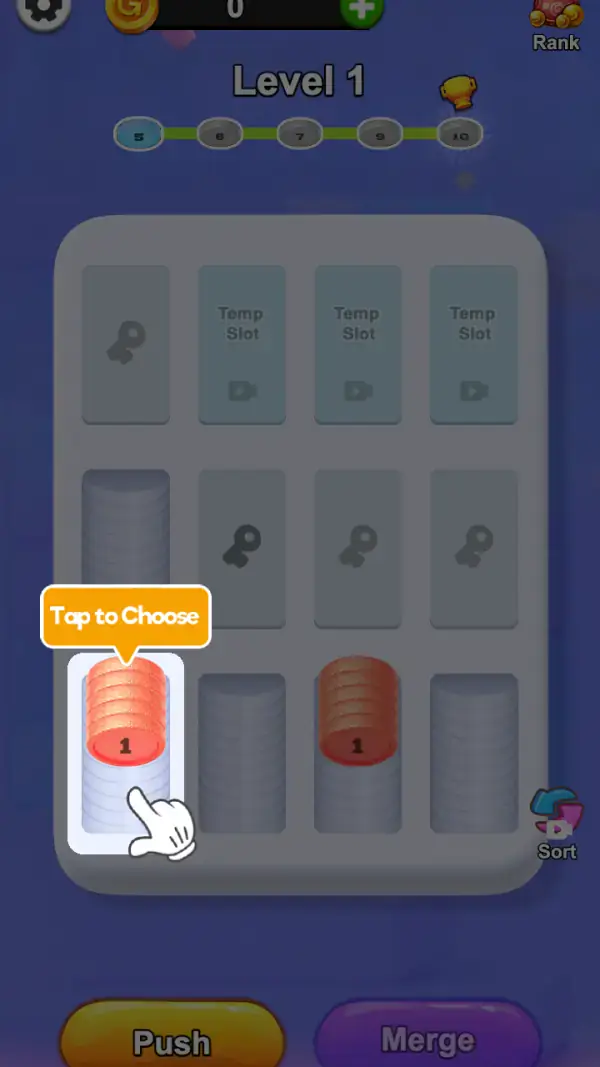
The board is a grey tray of twelve slots in three rows of four, and most of them are not yours. The top-left slot carries a keyhole, and the three beside it are labelled "Temp Slot" and each wear a video-camera icon. Of the middle row, the leftmost is an empty grey pedestal and the other three carry keyholes. Only the bottom row is fully open (frame 1). Five usable cells out of twelve is what Level 1 actually gives you.
The game tells you the first move outright. An orange callout reading "Tap to Choose" hangs over the leftmost stack, with a white gloved hand underneath it, and that stack is drawn inside a white rounded selection frame (frame 1). Two stacks are on the board, both with a red top disc stamped "1": one in the left cell, one in the third cell, with empty grey pedestals in between and to the right.
Below the tray are the two verbs: a yellow "Push" button and a purple "Merge" button side by side. Tucked at the bottom-right corner of the tray is a smaller "Sort" control — a blue-and-pink looped arrow with a video-camera badge on it. Above the board, "Level 1" sits next to a gold trophy cup, and under it a green track links five numbered nodes reading 5, 6, 7, 9 and 10, with the 5 filled teal and the 10 wearing a radiating sunburst (frame 1). The header carries a gear, a gold coin stamped G over a balance of 0 with a green plus, and a "Rank" button drawn as a sack of coins.
Gameplay screenshots
Captured from the build running on this page, not promotional art. Every claim in the guide above names the frame it comes from.
How to Play
- Tap a stack until the "Tap to Choose" callout is satisfied and the stack is framed in white (frame 1).
- Press "Merge" when the neighbour you are facing carries the same number; press "Push" when you only need to move a stack out of the way.
- Keep the two red 1-stacks apart until each has grown — merging two value-1 stacks wastes a merge that could have advanced both.
- Aim at the teal node on the track first. On Level 1 that is 5, and the rest of the track reads 6, 7, 9, 10 (frame 1).
- Use "Sort" when the tray is cluttered and you can no longer see which stacks match — but note it wears a video-camera badge, so it costs a video, not a tap.
- Open a "Temp Slot" only when the five open cells are genuinely full; the extra cell is parking space you paid a video for.
Choose, then Push or Merge
The interface separates selection from action: "Tap to Choose" picks a stack, and only then do "Push" or "Merge" apply (frame 1). Two buttons for one move means direction and combination are different decisions — Push relocates, Merge combines. No frame shows what either one does once pressed, so treat the first few moves as the tutorial.
Milestones at 5, 6, 7, 9 and 10
The node track under "Level 1" names the targets rather than a score, and the numbers are 5, 6, 7, 9 and 10 — note there is no 8 (frame 1). Since the live stacks start at value 1, every milestone is a stacking problem: you cannot reach 5 by pushing ones around, only by merging them repeatedly.
Temp Slots, keyholes and a locked-open tray
Three cells are reserved as "Temp Slot", each with a video-camera icon, and four more carry a keyhole (frame 1). The Temp Slots sit in the top row and the keyholes are split between the top-left and the middle row, so the tray opens in two different ways — one you buy with a video, one you reach.
Tips & strategies
- The empty pedestals are not decoration — the middle-row and bottom-row grey columns are the cells you can grow stacks into, and there are three of them on this board.
- The coin balance read 0 on the frame (frame 1), so the early board is not a shopping exercise.
- The gold trophy beside "Level 1" and the "Rank" sack in the header are the two competitive elements; neither is required to play.
- Four keyhole cells and three Temp Slots means the tray opens up as you progress — later levels have more room, not more rules.
Where players go wrong
- Merging the first pair you see. With only five open cells, an early merge can lock the layout.
- Treating "Push" and "Merge" as the same button — one moves, the other combines, and only one of them advances a milestone.
- Counting the tray as a four-by-four grid. It is three rows of four, and most of it is closed on Level 1.
Playing on phone, tablet and desktop
Portrait, with the tray filling the middle of the screen and Push and Merge as two large buttons side by side along the bottom edge. The "Tap to Choose" callout and hand cursor (frame 1) are sized for a phone, which is what the layout assumes. No keyboard control appears on any captured frame.
Frequently Asked Questions
What do Push and Merge do?
They are the two action buttons under the tray — yellow and purple respectively. You select a stack first, which the game labels "Tap to Choose" (frame 1), then Push moves it and Merge combines it. The frames we captured show the choice, not the result.
What are the Temp Slots?
Three cells across the top of the tray, each labelled "Temp Slot" and carrying a video-camera icon (frame 1). They are extra parking space bought with a rewarded video.
What do the numbers 5, 6, 7, 9 and 10 mean?
The milestone track under "Level 1". They are the stack values the level wants you to build; the 5 is filled teal as the current target and the 10 has a sunburst behind it as the last node.
Why are some cells locked?
Four cells show a keyhole rather than a pedestal (frame 1) — one at the top-left and three across the middle row. Five cells are usable at the start.
What is the Sort button?
A small control at the bottom-right of the tray: a blue-and-pink looped arrow with a video-camera badge and the label "Sort". The badge means it is video-backed; what it reorders is not shown in the frames we captured.