About Ace Strike
Swipe a small fighter across the screen while numbered burning targets descend, and track the level as a Xeno-Virus percentage rather than a score.
A vertical space shooter played by swiping a small fighter across a moonlit foreground while numbered burning targets descend; the level is tracked as a virus percentage, not as a score.
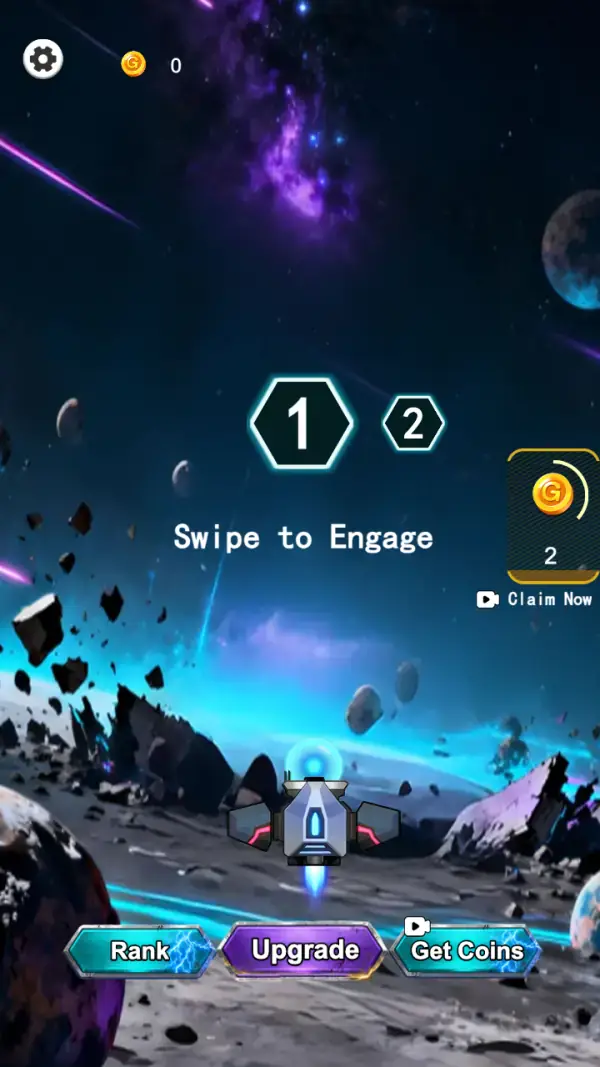
The opening screen is a hangar without walls: a grey-and-cyan fighter idling on a cratered moon surface, a nebula above it, and one line of instruction in the middle of the screen — "Swipe to Engage" (frame 1). Two hexagon badges sit above that line, a large lit "1" and a smaller dim "2", which is the whole level selector (frames 1–2). Along the bottom are three buttons: "Rank", "Upgrade" and "Get Coins", the last wearing a video icon (frame 1).
Once a run starts, the same ship sits at the bottom of the screen firing cyan bolts upward at a cluster of burning planets drifting down from the top (frame 2). Each planet carries a large number — 1, 2, 7, 13 and 79 are all visible in one frame — and that is the only feedback the targets give. There is no crosshair and no fire button, which is consistent with the one instruction the menu gives: you swipe, the ship moves, the guns run themselves.
The header is the interesting part. A cyan bar runs under the two hexagons, and beneath it a line reads "Xeno-Virus: 97%" (frame 2). That percentage, not the coin counter beside it, is what the level is actually measuring — you are burning a virus down, and the numbered planets are the things standing between you and it.
Gameplay screenshots
Captured from the build running on this page, not promotional art. Every claim in the guide above names the frame it comes from.

How to Play
- Swipe on the lower half of the screen to move the fighter — the menu tells you this is the control before the run even starts (frame 1).
- Pick off the low-number targets first. A planet showing 1 clears in a moment and leaves the screen, while a 79 is still standing there after the rest are gone.
- Stay under the gap in the cluster rather than under the cluster itself; drifting into the middle of a dense group costs position you cannot get back.
- Watch the cyan bar and the "Xeno-Virus" percentage rather than the coin counter — the percentage is the level's finish line (frame 2).
- Between runs, spend coins on "Upgrade" before worrying about "Rank" — the rank button is a ladder you are placed on, the upgrade button is the one that changes what you bring to it (frame 1).
- Tap "Claim Now" on the coin card when it is offering a payout you have already earned (frames 1–2) — it costs a video, not coins.
Swipe to Engage is the entire control set
The menu states the verb outright (frame 1) and the play frame shows no fire button, no stick and no lane markers (frame 2). Position is the only decision, so the game rewards staying in the part of the screen where the densest cluster of targets is overhead.
Numbers on targets are the difficulty
The burning planets in frame 2 are labelled 1, 2, 7, 13 and 79. A 1 and a 79 in the same cluster is not decoration: the big numbers are the ones that will still be on screen when the small ones are gone, and they decide how long a wave lasts.
Coins, and three ways to spend or get them
"Rank", "Upgrade" and "Get Coins" line the bottom of the menu (frame 1), and a floating card on the right offers a coin payout behind a video — it read 2 at the menu and 18 during the run, both above a "Claim Now" button (frames 1–2). Upgrades are the persistent track; the claim card is the top-up.
Tips & strategies
- The two hexagons at the top are the level list. Only "1" is lit at the start (frame 1), so the second stage is earned, not chosen.
- The ship fires continuously once a run is going — you never press fire, so all your attention belongs to positioning.
- "Get Coins" carries a video icon on the menu itself, which means the currency has a free path and you are not required to spend real money to upgrade.
- The coin counter in the header was 16 mid-run against 0 at the menu (frames 1–2), so a single wave pays for itself quickly.
Where players go wrong
- Hunting the highest-number target first because it looks important. It soaks time; the small ones clear the screen.
- Treating the percentage as a health bar. "Xeno-Virus" is the objective meter, not your condition.
- Ignoring the claim card until it is empty — it is the only free coin source visible on either screen.
Playing on phone, tablet and desktop
Portrait, and it was filed as landscape in our own catalogue until this rewrite. The ship sits in the bottom quarter where a thumb can drag it across the full width, the targets come down from the top, and the three menu buttons are wide enough for one-handed use. No keyboard control appears on either captured frame.
Frequently Asked Questions
How do you shoot in Ace Strike?
You do not press fire. The menu instruction is "Swipe to Engage" (frame 1) and the play frame shows no fire button (frame 2) — the fighter runs its guns while you move it.
What do the numbers on the planets mean?
They are the targets' values — 1, 2, 7, 13 and 79 are all visible in a single frame (frame 2). They behave like hit points: the big ones take longer to clear.
What is Xeno-Virus?
The objective meter shown under the level hexagons, reading 97% in our captured run frame (frame 2). It is the thing the level is measuring.
Do I have to pay for coins?
No. "Get Coins" on the menu carries a video icon, and the floating card with "Claim Now" is also video-backed (frames 1–2).
Is there more than one level?
The selector shows two hexagons, 1 and 2, with only 1 lit at the start (frame 1). The second is locked until you clear the first.