About Tank Era
Drive a top-down car fitted with a roof turret, and choose between a fresh colour, a second vehicle and a video-funded heart top-up before the run.
A top-down car game where your vehicle carries a roof turret: the home screen sells you a colour, a second car and a heart top-up, and one button starts the run.
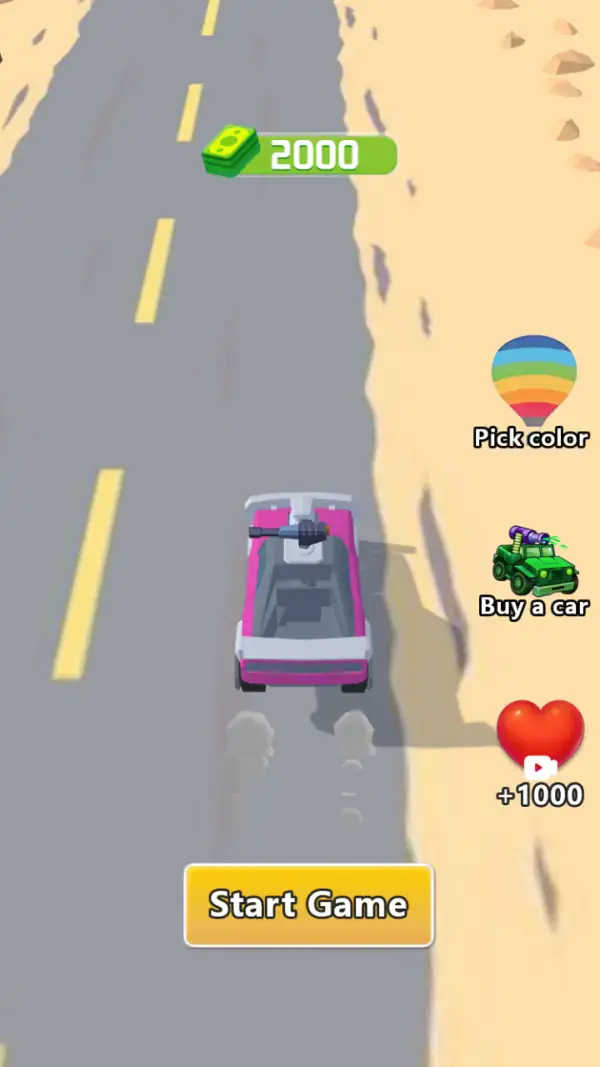
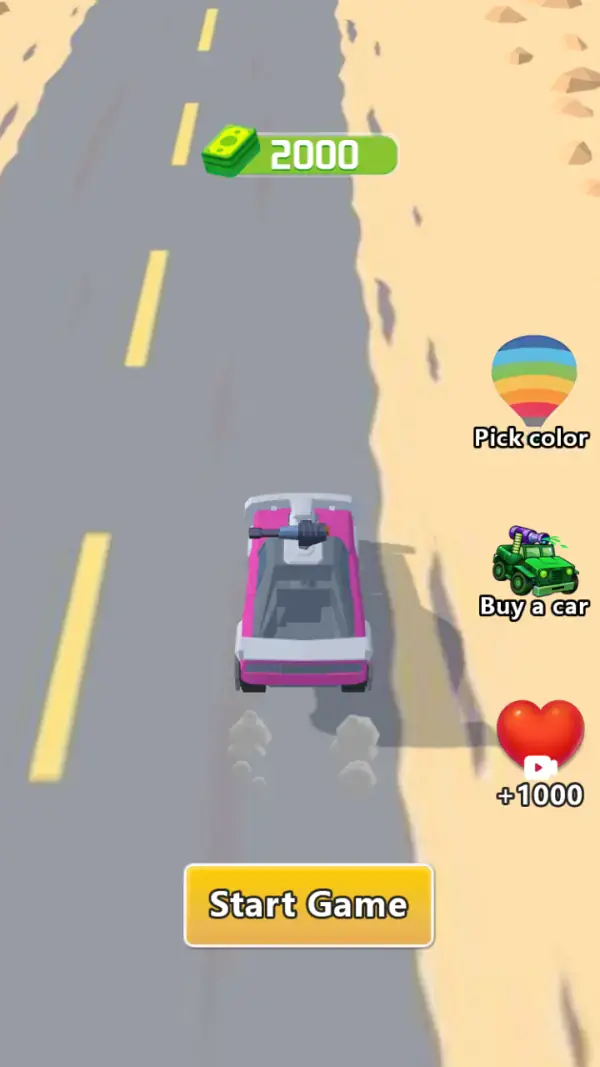
Everything on the first screen is a car seen from directly above, driving toward the top of the screen down a grey road with yellow dashes, bordered by sand and scattered rocks (frames 1–2). The car is pink and white, and the detail that defines the game is bolted to its roof: a barrel and mount, i.e. a turret. This is not a racing game — it is a driving game with a gun on it.
The right-hand column is the whole menu. A rainbow balloon labelled "Pick color", a green armed jeep labelled "Buy a car", and a red heart badged "+1000" carrying a video-play icon (frames 1–2). The cash counter at the top of the road reads 2000. So the three things the game offers before a run are the paint, the vehicle and a heart top-up — and the armed jeep in the "Buy a car" icon is a preview of what a purchased vehicle looks like.
A large yellow "Start Game" button sits at the bottom-left (frames 1–2). Our capture run pressed around it repeatedly and stayed on this screen, with only the road scrolling underneath — so this page describes the home screen and the economy you can see, and stops short of the driving itself rather than inventing it.
Gameplay screenshots
Captured from the build running on this page, not promotional art. Every claim in the guide above names the frame it comes from.
How to Play
- Set the paint first if you care about it: "Pick color" is the rainbow balloon at the top of the right-hand column (frames 1–2).
- Press the yellow "Start Game" button at the bottom-left to leave the home screen.
- Spend from the 2000 before you start if you want a second vehicle — "Buy a car" is the only purchase on the screen, and its icon shows an armed jeep rather than the pink car you are shown driving.
- Take the "+1000" heart if you are starting a session short: it carries a video icon, so it costs a video rather than cash.
- Everything above the "Start Game" button is a menu, not a control. The road behind it scrolls on its own (frames 1–2), which is an idle animation rather than a run in progress.
- What the run itself asks of you is not on any frame we captured, so we are deliberately not writing steering or shooting advice for this one.
Cash, not stars
The only counter on the home screen is a stack of notes reading 2000 (frames 1–2). There is no level number, no star row and no score displayed, which tells you the loop is measured in money: earn it on a run, spend it in the two menu buttons on the right.
A turret on a car
The weapon is mounted on the roof and points forward, in the direction the car drives (frames 1–2). That single piece of art defines the control problem: aiming and driving are the same action, so steering is the game's real skill — though no frame we captured shows the turret firing.
A heart bought with a video
The red heart is badged "+1000" with a video-play icon (frames 1–2), the standard marker for a rewarded video. It is the only option on the screen that does not appear to spend the cash balance — the other two are a cosmetic choice and a purchase.
Tips & strategies
- The home screen is the only place we saw where the car can be changed, so decide before you press Start rather than mid-run.
- A purchased vehicle looks like a different chassis in its icon, while "Pick color" is a balloon — cosmetic — so the two buttons are not competing for the same decision.
- The heart and the cash are separate counters. The heart is badged in thousands and takes a video; the cash is a stack of notes and is what the two shop buttons appear to spend.
- The desert road on the home screen has no junctions, exits or traffic drawn on it, so whatever the run adds is not hinted at here.
Where players go wrong
- Expecting a racer. The turret is the point — the vehicle exists to carry a forward-facing weapon.
- Reading the scrolling road as gameplay. It is the idle animation on the menu screen; the run only begins from "Start Game" (frames 1–2).
- Assuming the "+1000" heart is a life counter. It is topped up in thousands, which is not how lives are usually drawn, and no frame shows what it counts.
Playing on phone, tablet and desktop
Portrait. The road runs up the middle of a phone-shaped frame, the menu buttons are stacked down the right edge and Start Game is a wide button at the bottom — all of it inside thumb reach in one hand. On desktop the same portrait canvas is centred with the surroundings dark. We saw no keyboard control on the captured frames.
Frequently Asked Questions
Is Tank Era landscape or portrait?
Portrait. The build we captured renders as a vertical road filling a 720×1280 canvas (frames 1–2). Our catalogue metadata said landscape, which is one of the things this rewrite corrected.
What is the difference between "Pick color" and "Buy a car"?
"Pick color" is the rainbow balloon and is cosmetic. "Buy a car" is priced from the same cash balance and swaps the chassis — its icon shows an armed jeep rather than the pink car you start in.
What does the +1000 heart cost?
A video. The heart carries a play icon (frames 1–2), which is the rewarded-video marker, so it is the free way to top up the resource the heart counts.
Do I need to sign in or install anything?
No. It runs in the browser at its own address with no download and no account, like everything else in the catalogue.
What happens once you press Start Game?
We can only tell you as far as the home screen. Our capture run stayed there with the road scrolling, so we have described the visible economy instead of writing the driving section from the blurb.