About Shift Dash Reac
A four-lane runner whose entire interface is a single column on the right: Turn, Shop, Sign In and a skin you have already unlocked.
A lane runner played on a four-lane road where the whole interface is a single column on the right: Turn, Shop, Sign In, and a skin you have already unlocked.
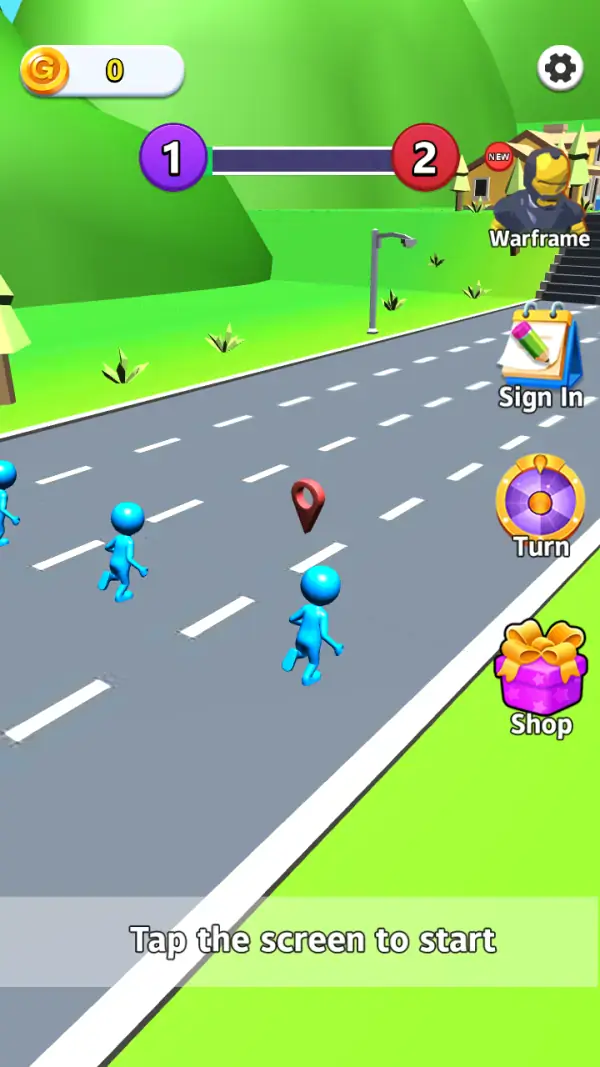
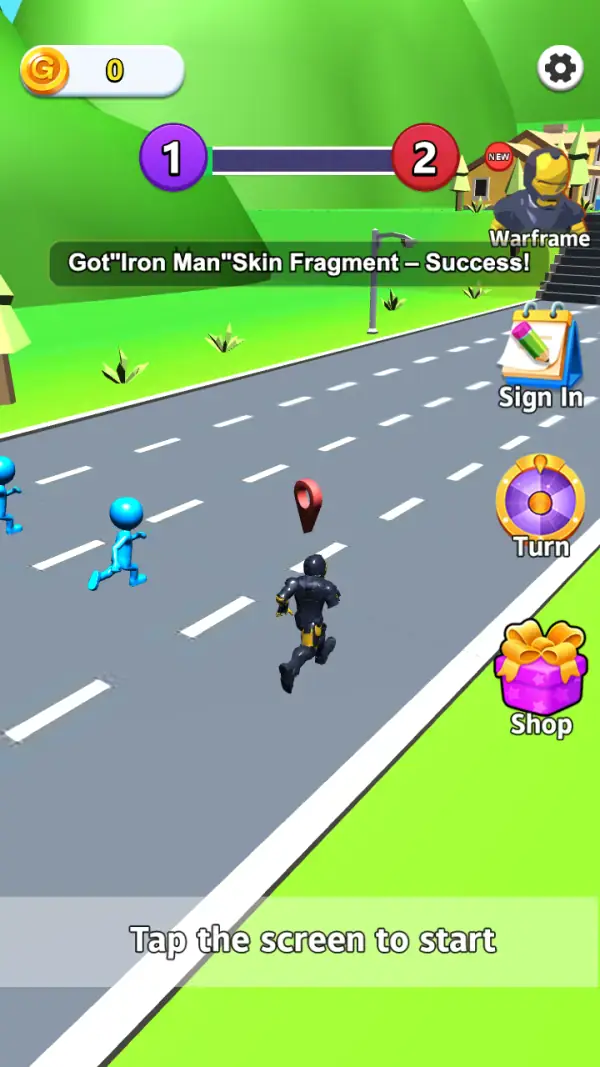
The scene is a wide grey road cut diagonally across a green hillside, marked with four lanes of dashes, and a caption across the bottom that reads "Tap the screen to start" (frames 1–2). Three plain blue stick figures run up the lanes on the left and a red map pin floats over the road ahead (frame 1); in the next frame a dark armoured figure has joined them in the middle lane (frame 2). Nothing on screen is a joystick — the only control named anywhere in the interface is the "Turn" button.
The right-hand column is the entire menu, stacked vertically: a notepad icon labelled "Sign In", a spoked wheel labelled "Turn", and a gift box labelled "Shop" (frames 1–2). Above them, at the top of a flight of steps, stands a golden-helmeted character tagged "Warframe" with a red "NEW" badge — the game's skin showcase, sitting inside the level rather than behind a menu.
The top of the screen holds a coin counter reading 0 on the left, a settings gear on the right, and between them a bar with a purple circle marked 1 at one end and a red circle marked 2 at the other (frames 1–2). Frame 2 also carries a toast reading "Got Iron Man Skin Fragment – Success!" with the quotes butted up against the words, which is how the game tells you that skins are assembled from fragments — and it is the same moment the armoured figure appears on the road.
Gameplay screenshots
Captured from the build running on this page, not promotional art. Every claim in the guide above names the frame it comes from.
How to Play
- Tap anywhere to get off the "Tap the screen to start" caption — the runner is already moving underneath it (frames 1–2).
- Watch which of the four lanes the red pin is floating over; it is the only marker on the road ahead.
- Use the "Turn" wheel when the road branches rather than steering continuously — it is a button, not a stick.
- Collect skin fragments as they drop; the toast in frame 2 is the game confirming one landed, and the armoured runner on the road is what the fragment belongs to.
- Open the "Shop" from the right column between runs, not mid-lane, since it is the only place the coin counter at the top-left can be spent.
- Skip "Sign In" if you only want a run — it is offered on the start screen but the game is already playable at that point.
Turn is the control
The wheel button on the right is labelled "Turn" and no other input affordance appears on the start screen (frames 1–2). In a game whose road runs diagonally through four lanes, that points to direction being the decision — you commit to a turn and the runner takes that lane.
Skins are built from fragments
The toast in frame 2 announces a "Skin Fragment" for Iron Man, and the armoured runner appears on the road in that same frame; the character standing on the steps is a "Warframe" skin marked NEW. So cosmetics are a collection track that fills during play, and the showcase is placed where you can see it while running.
A 1-versus-2 bar across the top
The purple 1 and red 2 sit at opposite ends of a progress bar (frames 1–2). The frames we captured do not show it moving, so we describe it as the level's two-sided counter rather than guess at what tips it.
Tips & strategies
- The interface lives entirely in the right column, so keep your thumb off that strip while running; taps there open menus instead of moving you.
- The coin balance was 0 on both captured frames, so the early lanes are where the economy actually starts.
- A "NEW" badge on the showcase character is the game telling you a skin is waiting to be equipped.
- The settings gear is top-right, well away from the Turn wheel — easy to hit by accident on a phone, worth knowing before it matters.
Where players go wrong
- Looking for a joystick. The only named control on the start screen is "Turn".
- Tapping the right-hand column during a run and ending up in the Shop.
- Assuming the 1-versus-2 bar is a score; the coin counter and the bar are different things and only one of them is money.
Playing on phone, tablet and desktop
Portrait, and deliberately one-handed: the road fills the left two-thirds of the screen and every button is stacked down the right edge. Our first capture pass rendered this build rotated 90 degrees because the catalogue had it filed as landscape; captured at the size it actually draws, it is a vertical game (frames 1–2).
Frequently Asked Questions
How do you control the runner?
The start screen names one control: the "Turn" wheel in the right-hand column (frames 1–2). There is no on-screen stick, and the game begins from a plain tap anywhere.
What are the buttons on the right?
From top to bottom: "Sign In" (a notepad), "Turn" (a spoked wheel) and "Shop" (a gift box). The character on the steps above them is the "Warframe" skin showcase.
What is the Iron Man message?
A toast reading "Got Iron Man Skin Fragment – Success!" (frame 2), rendered with the quotation marks butted up against the words. Skins are collected in fragments during runs, and this is the game confirming one — the armoured figure on the road in the same frame is the skin it refers to.
Do I have to sign in?
No. "Sign In" is a button on the start screen, but the level is already loaded and waiting on a tap.
Is it landscape?
No — portrait. It is filed as landscape in our own metadata, which the capture contradicted; that error is fixed as part of this rewrite.